Zoho AI FAQ

What Is the Difference Between Zia Agents and Zoho MCP?

They serve different roles in a Zoho AI architecture. Zia Agents are pre-built or custom autonomous workers built inside Zoho’s ecosystem — digital employees that handle specific business functions like lead qualification, HR onboarding, or invoice processing. Zoho MCP is the connectivity layer that allows external AI systems (agents, LLMs, or custom tools your team already uses) to interact with Zoho data and actions. In practice: Zia Agents run natively inside Zoho; Zoho MCP is how you bring outside AI into Zoho. Many advanced Zoho implementations use both together.

Can Zoho AI Be Implemented Without Disrupting Our Current Operations?

Yes. This is one of the practical advantages of Zoho’s approach. Because Zia is embedded inside your existing Zoho apps rather than being a separate platform to integrate, enabling AI capabilities is additive: you activate features within tools your team already uses. As an Advanced Zoho Partner we specialize in phased AI activation, identifying the highest-impact capabilities for your current stack and enabling them in a controlled sequence of sprints that doesn’t disrupt daily operations.

Is Zoho AI More Affordable Than Salesforce Einstein or HubSpot AI?

Generally, yes, and significantly so for mid-market businesses. Core Zia features are included in standard Zoho subscriptions with no additional AI license. This is possible because Zoho owns its infrastructure end-to-end and has invested in AI R&D since 2015 rather than licensing capabilities from OpenAI or other providers. Salesforce Einstein requires separate per-seat or per-conversation AI licensing on top of already-high base CRM costs. Advanced Zoho AI capabilities like Zia Agents have their own tier, but the total cost of ownership across an equivalent feature set is substantially lower than Salesforce’s stack.

What Is Zoho MCP and How Is It Different from Other Integrations?

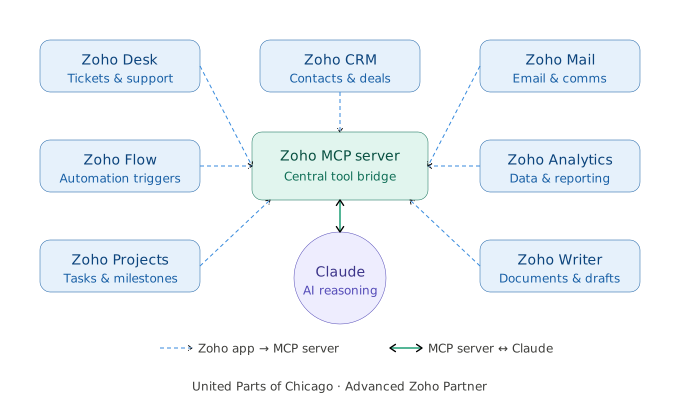
Zoho MCP Server (Model Context Protocol) is Zoho’s implementation of an open AI connectivity standard. It turns Zoho apps into agent-ready endpoints — meaning any MCP-compatible AI model (including GPT-4, Claude, or open-source LLMs) can connect to your Zoho CRM, Zoho Desk, Zoho Books, Zoho Projects, and other apps to both read data and execute real actions, all within your existing permission structure. Unlike traditional API integrations that require custom code for each workflow, Zoho MCP gives AI agents the context and authority to operate your tools autonomously. Think of it as the difference between an AI that can answer a question about your pipeline versus one that can actually update, schedule, and close deals inside it.

What is Zoho Zia?

Zoho Zia is Zoho’s core AI engine. It’s not a single app, but an intelligence layer that runs through the entire Zoho suite. It was launched in 2015 and has expanded from basic CRM predictions into a full multi-functional AI system that handles everything from email sentiment in Zoho Mail to attrition risk in Zoho People to deal scoring in Zoho CRM. Because Zoho owns its full technology stack, Zia’s models train on your organizational data without exposing it to any third-party AI vendor.

Oh, and Zia is an abbreviation—”Zoho AI.”

What is Zoho AI?

Zoho AI is the collective term for all artificial intelligence technologies built into the Zoho ecosystem — anchored by Zia, Zoho’s native AI engine embedded across 100+ business applications since 2015. It spans predictive analytics, natural language processing, agentic automation (Zia Agents), a proprietary large language model (Zia LLM), and the Zoho MCP server for connecting external AI tools to Zoho’s internal data and actions. Unlike many platforms that bolt AI on as a separate product, Zoho AI is woven into the tools your team already uses every day.

Ask Your Question

Our certified Zoho consultants are ready to answer.