Zoho MCP: Connect AI Agents to Your Zoho Applications
As an Advanced Zoho Partner, we implement Zoho MCP to make your Zoho applications AI-ready, including the ones that were never built for Zoho AI workflows.

Table of Contents
The AI Cannot Think. At All. But It Can Work—With Zoho MCP
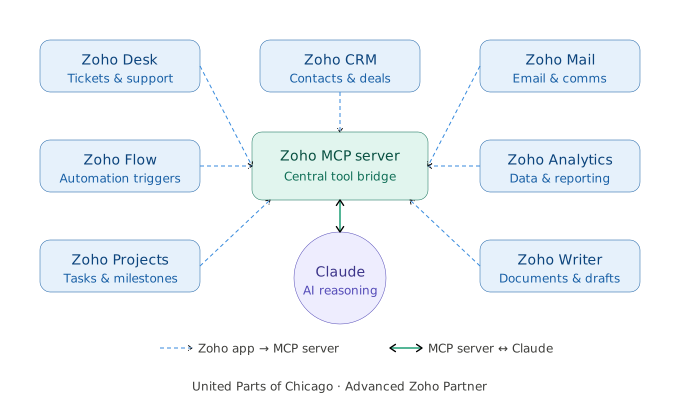
Zoho released Zoho MCP, a unique product built on the Model Context Protocol (MCP), a standard that lets AI agents communicate directly with business software. To put it simply: an MCP server (Zoho MCP) act as a bridge betwen an AI and your applications. From that point, your AI can operate your applications according to the scope you’ve allowed.
Unlike many Zoho AI implementations that overpromise, the combination of Zoho MCP and Claude delivers measurable results immediately upon the launch.
Now your Zoho AI agents can read, update, and act inside Zoho. In real time.



Any AI agent, IDE, or automation tool supports the Model Context Protocol will work with Zoho MCP.
How Does Zoho MCP Work?
Model Context Protocol (MCP) is an open standard that lets AI models connect to business software in a structured, reliable way. Think of it as a common language between your AI and your applications — so the AI doesn’t just answer questions, it actually gets things done inside your tools.
Zoho MCP is an application server that supports this protocol.
With Zoho MCP in place you can instruct popular AIs (currently Claude, Cursor, Windsurf, and VS Code) to interact with Zoho native or third-party applications and complete complex workflows with little to no human intervention.

Good Fit
Zoho MCP + Claude works well for…
- Lightweight, single-step agentic actions with a clear input and a narrow output
- Read-evaluate-write loops on one record at a time across any Zoho app
- Short prompts triggered by a Zoho Flow webhook that need a fast OK 200 response
- Field updates, classifications, assignments, or status changes based on record content
- Automations where the data is already in scope and the instruction is concise
These run smoothly in production today — fast execution, reliable responses, and well within both Flow's timeout and Claude's context limits.
Not a Fit (Yet)
Where you'll hit a wall…
- Backlog-scale analysis — fetching and processing many tickets in one prompt
- Multi-step agentic chains that risk exhausting Claude's context window
- Large HTML report generation passed back through Zoho Flow
- Creating large documents via Zoho Writer's MCP tool (Zoho-side limit)
- Prompts with rich templates pushing the 10,000-character Flow webhook limit
These are design constraints, not dealbreakers — preprocessing on the trigger side and Claude's batch API address most of them.
What Zoho Apps Work with Zoho MCP?
Note: this is not the full list, and is subject to change. The following list is correct as of 03/23/2026 and is taken directly from Zoho MCP.
- Zoho CRM
- Zoho WorkDrive
- Zoho Cliq
- Qntrl
- Zoho Projects
- Zoho Mail
- Bigin
- Zoho Desk
- Zoho Books
- Zoho Billing
- Zoho Inventory
- Zoho Invoice
- Zoho Expense
- Zoho Payroll
- SDP On Demand
- Zoho Apptics
- Zoho Notebook
- Endpoint Central
- Zoho DataPrep
- MDM
- Zoho Calendar
- Zoho Creator
- Site24x7
- Zoho Sprints
- Zoho Commerce
- CloudSpend
- Zoho Learn
- Zoho Analytics
- Zoho Writer
- Zoho Assist
- Zoho Lens
- Zoho Recruit
- Zoho Survey
- Zoho Bookings
Non-Zoho Apps That Work with Zoho MCP
Note: this is not the full list, and is subject to change. The following list is correct as of 03/23/2026.
- Accredible
- Act! 365
- actiTIME
- Active Collab
- ActiveCampaign
- ActiveDEMAND
- ActiveTrail
- Acuity Scheduling
- Adafruit IO
- AdRoll
- Aero Workflow
- AfterShip
- Agendor
- Agile CRM
- Agiled
- Aha!
- Aircall
- Akismet
- Alegra
- allmysms
- Amazing Marvin
- Amazon S3
- Amilia
- AnnounceKit
- Apify
- Apollo.io
- Appaloosa
- Appcues
- Appointment Hour Booking
- Apptio Targetprocess
- Arattai
- Arthur Online
- Asana
- AskNicely
- Asset Infinity
- Atera
- Autoklose
- Autopilot
- AWeber
- awork
- Azure DevOps
- Backlog
- BambooHR
- Baremetrics
- Basecamp 3
- Basin
- Beanstalk
- Beds24
- Beeminder
- Better Proposals
- Better Uptime
- Big Cartel
- BigMailer
- BigMarker
- BigTime
- Billbee
- Billit
- Billomat
- Billsby
- Billy
- Bitbucket
- Bitly
- Bitwarden
- Biztera
- BL.INK
- Blink
- BlueFolder
- BlueJeans
- BombBomb
- Bonusly
- Booqable
- Bouncer
- Bouncify
- Box
- BrainTree
- Breeze
- Breezy HR
- Brevo
- BuddyBoss
- Buffer
- BugHerd
- Builderall MailingBoss
- BulkGate
- BulkSMS
- Buttondown
- Cal.com
- Calamari
- CalendarHero
- Calendly
- Calley
- CallHub
- Campaign Monitor
- Campayn
- Canny
- Canvas LMS
- Capsule CRM
- Captain Data
- Cartloom
- CartRover
- Caspio
- CATS
- Cequens
- Certifier
- Chaport
- ChargeAutomation
- Chargebee
- ChargeOver
- ChartMogul
- ChatBot
- Chatra
- ChatWork
- Checkfront
- Cin7 Core Inventory
- Circle
- Clickatell
- ClickMeeting
- ClickSend
- ClickTime
- ClickUp
- Cliengo
- Clientify
- ClinchPad
- Cliniko
- Clinked
- Clockify
- Clockodo
- ClockworkSMS
- CloudCart
- Cloudflare
- CloudTalk
- Cloze
- Clustdoc
- CoachAccountable
- Coda
- Code Snippets
- Codeship
- Collect Reviews
- CompanyHub
- ConfigCat
- Confluence
- Connecteam
- Constant Contact
- ContactOut
- Contacts+
- Contentful
- ConvergeHub
- Copper
- Corsizio
- Cronofy
- Crowdin
- CS-Cart
- Current RMS
- Customer.guru
- Customer.io
- Customerly
- Cuttly
- Cuttly Team
- Cyberimpact
- Cyfe
- D7 SMS
- Dart
- Dashly
- Datadog
- DeBounce
- Delighted
- Demio
- Deskpro
- Detrack
- Dexi.io
- DigiMember
- Digistore24
- Direct Mail for Mac
- Dixa
- Drift
- Dwolla
- Dynatrace
- Easy Projects
- Easy Redmine
- Easybill
- Ecwid
- EdApp
- Edusign
- Egnyte
- Elastic Email
- Email Octopus
- Emailable
- Encircle
- Endorsal
- EngageBay
- Eventmaker.io
- Everhour
- Excel
- Expensify
- EZ Texting
- Fieldbook
- FireText
- Float
- Flow
- FluentCRM
- Follow Up Boss
- FollowUp.cc
- Forecast
- Formstack
- Freedcamp
- Freee
- FreshBooks
- Freshdesk
- FreshMail
- Freshsales
- Freshservice
- Front
- FullContact
- GatewayAPI
- Geckoboard
- Giphy
- Gist
- GitKraken Boards
- GitLab
- GoPinLeads
- GoToAssist
- GoToMeeting
- GoToTraining
- GoToWebinar
- Graphy
- Gro CRM
- Groove
- Guru
- Habitica
- Harpoon
- Heartbeat
- Help Scout
- HelpCrunch
- Helpjuice
- Helpshift
- Helpwise
- HighLevel
- Highrise
- Hive
- Hiveage
- Hootsuite
- Hub Planner
- HubSpot CRM
- Humanitix
- Jetpack CRM
- Jira Cloud
- Jira Service Management
- Kissflow
- Klaviyo
- Knack
- Kommo
- Lead Forensics
- Lemlist
- Lightspeed Retail POS (X-Series)
- Linnworks
- LiveChat
- Lnk.Bio
- Loyverse
- Lucid Meetings
- Mailchimp
- Mailercloud
- MailerLite
- Mailgun
- Mailify
- Mailigen
- Mailinator
- Mailjet
- MailPoet
- Mailshake
- Mailster
- MailZak
- Mavenlink
- MAXIO
- Memberstack 2.0
- Mercately
- MessageBird
- Microsoft Entra ID
- Microsoft Planner
- Microsoft Teams
- Microsoft To-Do
- Minutemailer
- Mixmax
- Mixpanel
- Mode
- ModWebs
- Monday
- MSG91
- MYOB AccountRight Live
- Myphoner
- NetHunt CRM
- NeverBounce
- Nexmo
- Nicereply
- Nimble
- noCRM.io
- Notion
- Nutshell
- Octadesk
- Octopush
- Office 365
- Office RnD
- Okta
- Omnisend
- OnceHub
- OneDrive
- OneNote
- OnePageCRM
- OneSignal
- Ontraport
- Opsgenie
- Orbit
- Order Desk
- Outlook
- Outreach
- Outseta
- Pabbly Subscriptions
- Paddle Billing
- PagerDuty
- Pandle
- Panorama9
- Papyrs
- ParseHub
- Parseur
- Parsio
- PartnerStack
- Paymo
- Paystack
- People HR
- PersistIQ
- Picky Assist
- Pipedrive
- Pipefy
- PipelineDeals
- Pivotal Tracker
- Planio
- Planyo
- PocketSmith
- Podio
- Postmark
- Powrbot
- PractiTest
- Printavo
- Printful
- Process Street
- Product Hunt
- Producteev
- Productive
- ProductPlan
- Proofy
- Prospect.io
- ProWorkflow
- Pushbullet
- Pusher
- Pushover
- Qase
- Qoyod
- Quaderno
- QuickFile
- Quire
- Raindrop.io
- Raven Tools
- Razorpay
- RD Station
- Rebrandly
- Recruitee
- Recurly
- Redbooth
- Redmine
- Referrizer
- Remarkety
- Rentman
- RepairShopr
- Reply
- Resource Guru
- Respond.io
- Retently
- Rezgo
- Ringover
- Rise
- Robly
- Rocket.Chat
- RocketReach
- Roll
- Rollbar
- Ronin
- Routee
- Runrun.it
- Ryver
- Saasu
- Sakari
- Saleor
- Sales.Rocks
- SalesBinder
- Salesflare
- Salesmate
- SalesRabbit
- SalesUp!
- Sansan
- Sarbacane
- Sellbrite
- Sellf
- Selz
- Sender
- SendFox
- Sendicate
- Sendloop
- Sendmunk
- SendOwl
- SendPulse
- Sendwithus
- SendX
- Sentry
- Sertifier
- ServiceDesk Plus Cloud
- ServiceM8
- SerwerSMS
- sevDesk
- Sharepoint
- Shipday
- Shiprocket
- ShipStation
- Shipwire
- Shopia
- Shoprocket
- Shortcut
- Sifter
- SignalWire
- Signaturit
- SIGNL4
- SimpleCert
- SimpleKPI
- Simplesat
- SimpleSign
- Simplicate
- Sinch MessageMedia
- Slybroadcast
- SmartHR
- SmartReach
- SmartrMail
- SmartRoutes
- Smartsheet
- SmartSuite
- SmartSurvey
- Smoove
- SMS Alert
- sms77
- SMSFactor
- SMSGatewayCenter
- snapADDY
- Snipe-IT
- Snovio
- Splitwise
- Spoki
- Spot Hit
- SpringEdge
- Square
- Squarespace
- Stannp
- Starred
- Starshipit
- Status Hero
- Status.io
- StatusCake
- StatusCast
- StatusHub
- Statuspage
- Stax
- Stillio
- Stocktwits
- StoreHippo
- Stormboard
- Storyblok
- Strava
- Streak
- Stripe
- SuiteDash
- SuperOps
- SupportBee
- SureCart
- Surveypal
- Surveytown
- Survicate
- Swapcard
- Swit
- Switchy
- Sympla
- Synchroteam
- Syncro
- Synqtel
- Systeme.io
- T.LY
- Talent LMS
- Tallyfy
- Taskworld
- TaxJar
- Teachworks
- Teambook
- Teamdeck
- TeamGantt
- Teamgate
- TeamGrid
- Teamleader
- Teamup Calendar
- TeamViewer
- TeamWave
- Teamwork Desk
- Teamwork Projects
- Telerivet
- Telnyx
- Tempo
- TextIt
- Tick
- TimeCamp
- TMetric
- Todoist
- Toggl Track
- TrainerCentral
- Trigger
- Twilio
- UseResponse
- Vero
- WATI
- Wave
- Wealthbox CRM
- WebinarGeek
- Woodpecker
- Woodpecker.co
- WorkMarket
- WorkMarket Relay
- Workstack
- Wrike
- X-Cart
- XING Events
- Xverify
- YouCanBook.me
- ZappHub
- Zendesk
- zenloop
- Zingtree
- Zippykind
- Zulip
Zoho MCP Resources
Zoho MCP Knowledge Base (as of today, 03/23/2026, it contains only one article; we hope that more will follow).
Talk to a Certified Zoho Partner
We use Zoho MCP (with Claude) ourselves and have already deployed working solutions for our customers. If your team is ready to stop toggling between apps and start letting AI handle the routine work inside Zoho, we’ll show you exactly how it works with your data, your apps, and your workflows.